Uno error codes
MSBuild Errors
UNOB0001: Cannot build with both Uno.WinUI and Uno.UI NuGet packages referenced
This error code means that a project has determined what both Uno.WinUI and Uno.UI packages are referenced.
To fix this issue, you may be explicitly referencing Uno.UI and Uno.WinUI in your csproj, or you may be referencing a NuGet package that is incompatible with your current project's configuration.
For instance, if your project references Uno.WinUI, and you try to reference SkiaSharp.View.Uno, you will get this error. To fix it, you'll need to reference SkiaSharp.View.Uno.WinUI instead.
UNOB0002: Project XX contains a reference to Uno Platform but does not contain a WinAppSDK compatible target framework
This error code means that a WinAppSDK project is referencing a project in your solution which is not providing a net7.0-windows10.xx TargetFramework.
This can happen if a project contains only a net7.0 TargetFramework and has a NuGet reference to Uno.WinUI.
To fix this, it is best to start from a Cross Platform Library project template provided by the Uno Platform visual studio extension, or using dotnet new.
UNOB0003: Ignoring resource XX, could not determine the language
This error may occur during resources (.resw) analysis if the framework does not recognize the specified language code.
For instance, the language code zh-CN is not recognized and zh-Hans should be used instead.
UNOB0004: The $(UnoVersion) property must match the version of the Uno.Sdk defined in global.json
The build process has determined that an MSBuild property was defined to override UnoVersion. This property is defined by the Uno.Sdk and cannot be changed and must be updated through the global.json file
Follow this guide in order to update the Uno Platform packages.
UNOB0005: The Version of Uno.WinUI must match the version of the Uno.Sdk found in global.json
The build process has determined that the version of the Uno.WinUI NuGet package does not match the Uno.Sdk version. In general, restarting your IDE and compiling again will fix this issue.
Follow this guide in order to update the Uno Platform packages.
UNOB0006: The UnoFeature 'XX' was selected, but the property XXXVersion was not set
The build process has determined that you have specified an UnoFeature that requires a version to be set for a Package group such as Uno.Extensions, Uno.Toolkit.WinUI, Uno Themes, or C# Markup. Update your csproj file or Directory.Build.props with the property specified in the error along with the version that you would like to pin your build to.
UNOB0007: AOT compilation is only supported in Release mode. Please set the 'Optimize' property to 'true' in the project file
The build process has detected that you have set the value UnoGenerateAotProfile to true for a build configuration that has not optimized the assembly (i.e. Debug build Configuration). You should only generate an AOT profile from a build Configuration that will optimize the assembly such as the Release build Configuration.
UNOB0008: Building a WinUI class library with dotnet build is not supported
Building a net10.0-windows10.x.x class library using dotnet build is not supported at this time because of a Windows App SDK issue, when the library contains XAML files.
To work around this, use msbuild /r on Windows. You can build using msbuild with a Developer Command Prompt for VS 2022 (or 2026), or by using vswhere or using GitHub actions scripts in a CI environment.
This particular check can be disabled by setting the msbuild property UnoDisableValidateWinAppSDK3548 to true.
UNOB0009: Uno Platform Implicit Package references are enabled
When Uno Implicit Package References are enabled you do not need to provide an explicit PackageReference for the Packages listed in the build message. You should open the csproj file, find and remove the <PackageReference Include="{Package name}" /> as listed in the build message.
Alternatively you may disable the Implicit Package References
<PropertyGroup>
  <DisableImplicitUnoPackages>true</DisableImplicitUnoPackages>
</PropertyGroup>
UNOB0010: The browserwasm TargetFramework must not be placed first in the TargetFrameworks property
In Visual Studio 2022/2026, an issue prevents debugging and Hot Reload from working properly for all targets when the net10.0-browserwasm TargetFramework is placed first in the TargetFrameworks property.
Make sure to place net10.0-browserwasm last in your <TargetFrameworks> property.
This warning can be disabled by adding the following to your .csproj:
<PropertyGroup>
  <UnoDisableVSWarnBrowserIsFirst>true</UnoDisableVSWarnBrowserIsFirst>
</PropertyGroup>
UNOB0011: Retired
Note
This error code is retired. It warned when the desktop TargetFramework was placed first
while targeting Visual Studio 17.11 or earlier — a version that can no longer build Uno
Platform 7.0 (minimum MSBuild is 17.14). The check and its UnoDisableVSWarnDesktopIsFirst
opt-out have been removed. This heading is kept so existing links to it still resolve.
UNOB0012: The windows TargetFramework must not be placed first in the TargetFrameworks property
In Visual Studio 2022/2026, an issue prevents other platforms debugging from working properly when the net10.0-windows10.xxx TargetFramework is placed first in the TargetFrameworks property.
Make sure that net10.0-windows10.xxx is not first in your <TargetFrameworks> property.
This warning can be disabled by adding the following to your .csproj:
<PropertyGroup>
  <UnoDisableVSWarnWindowsIsFirst>true</UnoDisableVSWarnWindowsIsFirst>
</PropertyGroup>
UNOB0013: The net10.0 TargetFramework must not be placed first in the TargetFrameworks property
In Visual Studio 2022/2026, an issue prevents other platforms debugging from working properly when the net10.0 TargetFramework is placed first in the TargetFrameworks property.
Make sure that net10.0 is not first in your <TargetFrameworks> property.
This warning can be disabled by adding the following to your .csproj:
<PropertyGroup>
  <UnoDisableVSWarnNetIsFirst>true</UnoDisableVSWarnNetIsFirst>
</PropertyGroup>
UNOB0014: The target framework is not supported on macOS or Linux
When building with Rider on Linux or macOS, unsupported target frameworks are not filtered automatically like other IDEs.
See how to make platforms conditional for Rider.
UNOB0015: Retired
Note
This error code is retired. It warned when the desktop TargetFramework was not placed first while targeting Visual Studio 17.12.x specifically — a version that can no longer build Uno Platform 7.0 (minimum MSBuild is 17.14). The check has been removed. This heading is kept so existing links to it still resolve.
UNOB0016: The Publish Profile file must not contain the "PublishDir"
When publishing an app using ClickOnce on Windows, the PublishProfile file may not contain a PublishDir entry if the command line parameter UnoClickOncePublishDir has been set.
This situation is due to an MSBuild property overriding bug found in the .NET SDK. For more information, see our publishing with ClickOnce documentation.
UNOB0017: A reference to either Uno.WinUI.Runtime.WebAssembly or Uno.WinUI.WebAssembly has been detected
The Uno.WinUI.Runtime.WebAssembly and Uno.WinUI.WebAssembly packages must not be referenced directly alongside the Skia browser head. Removing the explicit reference resolves the diagnostic.
This is generally a package authoring error, make sure to open an issue in the Uno Platform repository to report the problem.
UNOB0018: Code signing cannot be applied on files with extended attributes (e.g. iCloud)
On macOS code signing will fail if the project's output is located inside a directory that is backed up using iCloud. This is because iCloud adds some extended attributes to files and directories while codesign will refuse to sign such files.
ref: https://developer.apple.com/library/archive/qa/qa1940/_index.html
Solution: Move your Uno solution/project(s) to a different location, one that is not backed up by iCloud.
UNOB0019: The DevServer package cannot be used with optimized builds
The DevServer package (Uno.WinUI.DevServer or Uno.UI.DevServer) is intended for development builds only and provides features such as Hot Reload and Remote Control debugging. These features should not be included in optimized/release builds.
To fix this issue:
- If you're building for release, remove the
PackageReferencetoUno.WinUI.DevServerorUno.UI.DevServerfrom your project file - If you need to keep the package reference, set
<Optimize>false</Optimize>in your project configuration - Consider using conditional package references that only include DevServer in Debug configuration:
<ItemGroup Condition="'$(Configuration)' == 'Debug'">
  <PackageReference Include="Uno.WinUI.DevServer" Version="X.X.X" />
</ItemGroup>
UNOB0020: A referenced platform-specific assembly uses Uno Platform types that no longer exist
On an iOS, Android, or tvOS head, a referenced package that multi-targets provides its netX.0-ios, netX.0-android, or netX.0-tvos assembly, and that assembly is the one your application compiles against and deploys. This diagnostic reports that the assembly references types from Uno.UI that are not present in the version of Uno Platform in use, which means it was built against an earlier release and will fail at runtime.
Update the package to a version built for the Uno Platform release you are using. If no such version exists, reference a package version that does, or remove the reference.
Before Uno Platform 7.0, the platform-specific assembly of such a package was silently replaced by its platform-neutral netX.0 assembly, which hid this incompatibility — at the cost of discarding the package's #if __IOS__ and #if __ANDROID__ code. That substitution no longer happens.
The diagnostic compares type references only, so it cannot detect a package that uses a type which still exists but whose members changed. Treat it as a signal to update the package rather than as an exhaustive compatibility check.
To suppress it:
<PropertyGroup>
  <UnoDisableUNOB0020Validation>true</UnoDisableUNOB0020Validation>
</PropertyGroup>
UNOB0021: A package has no version in the Uno.Sdk manifest and does not exist on nuget.org
The Uno.Sdk adds some package references implicitly and takes their versions from its package manifest. When the manifest has no version for one of them, the Uno.Sdk falls back to the latest version on nuget.org. This error means that package isn't on nuget.org at all, which usually means the Uno.Sdk version you use was built against packages that are only available on a private feed.
To fix this issue:
- Update to a newer Uno.Sdk version, or
- Reference the package explicitly with a version, which replaces the implicit reference (with Central Package Management, put the version in a
PackageVersionitem instead):
<ItemGroup>
  <PackageReference Include="Uno.UI.Composition.Skia" Version="X.X.X" />
</ItemGroup>
UNOB0022: The SingleProject property is no longer supported
SingleProject was the Uno Platform 5.1-and-earlier spelling of UnoSingleProject. It no longer selects the single-project layout, so leaving it in place would silently build the project as if it were not a single project.
Rename the property in your .csproj:
- <SingleProject>true</SingleProject>
+ <UnoSingleProject>true</UnoSingleProject>
UNOB0023: A runtime-enabled package provided no runtime assembly
Packages such as Uno.WinRT and Uno.Foundation ship a platform-neutral compile surface under lib/ and the assemblies that actually run under uno-runtime/. This diagnostic reports that one of them contributed no runtime assembly for the target framework being built, which means the reference assemblies would be deployed instead and every call into them would throw NotImplementedException at runtime.
The most common cause is a package built for Uno Platform 6.x. Uno Platform 7.0 renamed the runtime folders from uno-runtime/<tfm>/skia and uno-runtime/<tfm>/webassembly to uno-runtime/<tfm>/generic and uno-runtime/<tfm>/wasm, and a package in the old layout is not binary compatible with 7.0 anyway, so it has to be updated to a version built for 7.0. SkiaSharp.Views.Uno.WinUI is one such package; applications drawing with Skia on Uno Platform can use SKCanvasElement instead.
Other causes are a partially restored package, a PackageBasePath pointing at a location that does not contain the expected uno-runtime folder, or a mismatched set of Uno Platform package versions. Verify that all Uno.* package versions match, then clear obj/ and bin/ and restore again.
The same code reports a package that provides its runtime assemblies but lacks one of the pieces a head needs: the browser build of a WinRT assembly under uno-runtime/<tfm>/wasm, the lib/netX.0-<platform> implementation for an Android, iOS or tvOS head, or the matching reference assembly. It also reports a cross-runtime library whose UnoRuntimeVariant is not Generic, Wasm or Reference, and a head with a Uno Platform runtime host whose target platform has no runtime assets — only desktop, browserwasm, android, ios, tvos and plain netX.0 target frameworks do. The message names the package and the path that was expected.
Before Uno Platform 7.0 this situation was reported only as a build message, so it surfaced as a runtime failure rather than a build failure.
To suppress it:
<PropertyGroup>
  <UnoDisableUNOB0023Validation>true</UnoDisableUNOB0023Validation>
</PropertyGroup>
UNOB0024: A runtime identifier property no longer selects runtime assets
UnoRuntimeIdentifier, UnoUIRuntimeIdentifier and UnoWinRTRuntimeIdentifier used to tell the build which runtime assets to deploy. As of Uno Platform 7.0 that is decided by the target framework, so setting them on an application head no longer selects anything and they can be removed.
A cross-runtime library used UnoRuntimeIdentifier to name the uno-runtime folder its output is packed into. It now sets UnoRuntimeVariant instead — Generic, Wasm or Reference — and the folders are named after it (generic and wasm, formerly skia and webassembly). The old property is still honored for a library, mapping skia to Generic and webassembly to Wasm.
The warning therefore covers three situations, each with its own message:
| Message | Where | What to do |
|---|---|---|
UnoUIRuntimeIdentifier and UnoWinRTRuntimeIdentifier no longer have any effect |
any project | remove them |
UnoRuntimeIdentifier no longer selects runtime assets for an application head |
a project with a Uno Platform runtime host | remove it |
UnoRuntimeIdentifier is deprecated for cross-runtime libraries |
a library without a runtime host | set the UnoRuntimeVariant value the message names |
To suppress it:
<PropertyGroup>
  <UnoDisableUNOB0024Validation>true</UnoDisableUNOB0024Validation>
</PropertyGroup>
UNOB0025: Runtime-enabled packages are referenced without a runtime host
This application head references packages that ship their implementation under uno-runtime/ — such as Uno.WinRT and Uno.Foundation — but no Uno Platform runtime host package was detected (each Uno.WinUI.Runtime.* package declares itself by setting the UnoHasRuntimeHost MSBuild property), so the reference assemblies would be deployed and every call into them would throw NotImplementedException at runtime.
The usual cause is an explicit reference to a Uno.WinUI.Runtime.Skia.* host package, which predates the 7.0 rename and does not declare the runtime host. Those ids receive no 7.0 builds, so replace each one with its renamed Uno.WinUI.Runtime.* id (Uno.WinUI.Runtime.Skia.Headless becomes Uno.WinUI.Runtime.Headless; see the Uno Platform 7.0 migration guide for the full mapping), then align every Uno.* package version and restore again.
When such an older runtime host is detected, this is reported as an error. Otherwise it is a warning, since an executable project that is not an application, such as a test project, can legitimately run against the reference assemblies.
To suppress it:
<PropertyGroup>
  <UnoDisableUNOB0025Validation>true</UnoDisableUNOB0025Validation>
</PropertyGroup>
UNOB0026: A referenced assembly was built for a UI runtime that no longer exists
Uno Platform releases before 7.0 stamped the UI runtime an assembly was built for into its UnoUIRuntimeIdentifier assembly metadata. This diagnostic reports a referenced assembly whose stamp names one of the native renderers, which 7.0 removed — such an assembly cannot run against this release.
Update the package to a version built for Uno Platform 7.0. Assemblies built by 7.0 carry no stamp, since there is a single UI runtime, and are always accepted.
To suppress it:
<PropertyGroup>
  <UnoDisableUNOB0026Validation>true</UnoDisableUNOB0026Validation>
</PropertyGroup>
UNOB0027: The file suffix is no longer recognized by Uno Platform 7.0
Uno Platform 7.0 removed the *.Apple.cs, *.iOSmacOS.cs, and *.reference.cs file suffixes. The build no longer excludes these files from any target framework, so each of them now compiles for every target framework of the project, the WinAppSDK one included. Rename or remove the file:
| Suffix | Replacement |
|---|---|
*.Apple.cs |
*.UIKit.cs, which has the same rule |
*.iOSmacOS.cs |
*.iOS.cs. It named the native macOS target, which was removed in 7.0 |
*.reference.cs |
Delete the file, or fold it into a *.crossruntime.cs file. It was gated on a build flavor that an application never selected, so it compiled for no target framework |
*.skia.cs is still recognized, but it now compiles for every target framework except the WinAppSDK one, not only for netX.0-desktop. See Platform targeting in multi-targeted libraries for the other changes.
UNOB0029: Uno Platform application projects must use the Uno.Sdk
Starting with Uno Platform 7.0, an application must be built with the Uno.Sdk. The legacy project format — a Microsoft.NET.Sdk project referencing the Uno.WinUI package, together with one head project per platform (MyApp.Mobile, MyApp.Wasm, MyApp.Skia.Gtk, MyApp.Windows, …) — is no longer supported.
To fix this, migrate your application to the Uno.Sdk by following the Migrating Projects to Single Project guide.
This diagnostic is only raised for application projects (Exe and WinExe). Class libraries that reference the Uno.WinUI package directly are not affected, and neither are Windows App SDK heads or test projects (IsTestProject or IsTestingPlatformApplication set to true, which Microsoft.NET.Test.Sdk, MSTest.Sdk and the common test runners do for you).
If your project is an executable that merely links Uno.WinUI as a library — a console harness or a benchmark runner, for instance — disable the check:
<PropertyGroup>
  <UnoDisableUNOB0029Validation>true</UnoDisableUNOB0029Validation>
</PropertyGroup>
UNOB0028: The UnoSplashScreenColor property is no longer supported, or an optional implicit package was skipped
This code is reported for two unrelated causes. The text of the diagnostic tells which one applies:
- A warning that the
UnoSplashScreenColorproperty is no longer supported: see The UnoSplashScreenColor property is no longer supported. - A build message, shown at
normalverbosity or higher, that the implicit reference to a package was skipped: see An optional implicit package was skipped.
UNOB0028: The UnoSplashScreenColor property is no longer supported
Uno Platform 7.0 removed the UnoSplashScreenColor property. The Uno.SDK ignores it, so the splash screen background falls back to its default (#FFFFFF, or the browser theme on WebAssembly). Rename it:
<PropertyGroup>
  <UnoSplashScreenBackgroundColor>#FFFFFF</UnoSplashScreenBackgroundColor>
</PropertyGroup>
The same applies to UnoSplashScreen items declared by hand: use BackgroundColor="#FFFFFF" instead of Color="#FFFFFF". See Splash screen for the related UnoSplashScreenDarkBackgroundColor and UnoSplashScreenDarkFile properties.
UNOB0028: An optional implicit package was skipped
Some packages the Uno.Sdk adds implicitly are optional and only exist from a given version of their package group. Uno.HotTesting.Reactive, added for the MVUX feature in non-optimized builds, first ships with the 7.4 builds of Uno.Extensions. This message means the Uno.Extensions version resolved for your project is older than that, is a floating version or a range, or is missing from the Uno.Sdk package manifest, so the package was left out instead of being restored at a mismatched version.
The rest of the build is unaffected. If you need the package:
- Use an
UnoExtensionsVersionof 7.4 or later, as an exact version, or - Reference the package explicitly with a version that matches your Uno.Extensions packages.
To stop the Uno.Sdk from adding it at all, set UnoDisableHotTesting to true.
UNOB0030: The SkiaRenderer Uno Feature is ignored in a library
Starting with Uno Platform 7.0, the renderer is chosen by the app, not by its libraries. On the Uno Platform targets of an app, the legacy SkiaRenderer feature is still mapped to Skia. In a library it is ignored, so the library doesn't make SkiaSharp a dependency of every app that uses it, including apps that render with WebGPU only.
To fix this:
- If the library doesn't draw with SkiaSharp, remove
SkiaRendererfromUnoFeatures. - If it uses
SKCanvasElement, theSkiaExtensionsconversions or the Uno Toolkit's Skia controls (such asShadowContainer), replaceSkiaRendererwithSkia.
To keep SkiaRenderer without the warning, add UNOB0030 to NoWarn.
UNOB0031: The Reactor Uno Feature is not supported on WinAppSDK
The Reactor feature references Uno.Microsoft.UI.Reactor, which runs on the Uno Platform targets (desktop, WebAssembly, Android and iOS) and has no build for the WinAppSDK target. The Uno.Sdk doesn't reference it there, and fails the Windows build with this error instead of leaving every Reactor type unresolved.
To fix this, remove the -windows10.0.xxxxx target framework from the project. To run a Reactor app on Windows, use the desktop target.
UNOB0032: The browserwasm target framework was set after the Uno.Sdk chose the .NET SDK
The Uno.Sdk builds a WebAssembly app with the Microsoft.NET.Sdk.WebAssembly SDK, which it chooses from TargetFramework before your project file and Directory.Build.props are read. At that point, the target framework is only known when it is passed to the build: with -f, or by a project with several target frameworks building each of them.
When an app sets a single <TargetFramework>net10.0-browserwasm</TargetFramework> itself, in the project file, in Directory.Build.props or with a file-based app's #:property, the Uno.Sdk moves it to TargetFrameworks after the project file is read, so the app still builds with the WebAssembly SDK. It can only do so for a project it already knows is an app at that point, from an OutputType of Exe or WinExe, or from IsUnoHead.
This error means the project was only found to be an app later, typically because its OutputType is set in Directory.Build.targets. Built with the plain .NET SDK, it would be a desktop executable that fails at startup.
To fix this, set OutputType in the project file or in Directory.Build.props, or use the plural property, even with a single target framework:
<PropertyGroup>
  <TargetFrameworks>net10.0-browserwasm</TargetFrameworks>
</PropertyGroup>
UNOB0033: A Platforms/MacCatalyst or Platforms/MacOS folder is not built
Uno Platform 7.0 removed the Mac Catalyst target framework, and the native macOS target was removed before it; macOS is served by the desktop target framework instead. Projects created with older templates can still contain a Platforms/MacCatalyst/ or Platforms/MacOS/ folder (or a MacCatalyst/ or MacOS/ folder at the project root). The Uno.Sdk leaves their files out of every target framework and reports this warning, since none of them can use that code.
To fix this, move anything still needed to Platforms/Desktop/, and delete the folder. Code that should only run on macOS goes in an OperatingSystem.IsMacOS() check there. See Mac Catalyst is removed for the other migration steps.
UNOB0034: Lottie XAML on WinAppSDK needs the CommunityToolkit.WinUI.Lottie package
AnimatedVisualPlayer, LottieVisualSource and ThemableLottieVisualSource are built into Uno Platform, so the Uno Platform targets need no package for them. On Windows (WinAppSDK), LottieVisualSource and ThemableLottieVisualSource come from the CommunityToolkit.WinUI.Lottie NuGet package instead, which the Uno.Sdk doesn't reference. The Uno.Sdk reports this warning on the Windows target for each XAML file that declares the using:CommunityToolkit.WinUI.Lottie namespace while no reference to that package resolves. Without it, the build only fails with the XAML compiler's WMC0001: Unknown type 'LottieVisualSource'.
To fix this, reference the package for the Windows target framework:
<ItemGroup Condition="$(TargetFramework.Contains('windows10'))">
    <PackageReference Include="CommunityToolkit.WinUI.Lottie" />
</ItemGroup>
With central package management, add its version to Directory.Packages.props, for example <PackageVersion Include="CommunityToolkit.WinUI.Lottie" Version="8.2.250604" />. Otherwise, set the Version on the PackageReference.
UNOB0035: The Prism Uno Feature is no longer supported
Starting with Uno Platform 7.0, the Uno.Sdk no longer references Prism. The Prism feature is ignored if still listed in UnoFeatures, and the build reports this warning. Without a Prism reference of its own, the project then fails to compile wherever it uses Prism types.
The Prism packages published so far (Prism.Uno.WinUI 9.0.537 and earlier) were built against Uno Platform 5 and don't build with Uno Platform 7.0.
To fix this, remove Prism from UnoFeatures, and reference Prism's packages directly, using a Prism release built for Uno Platform 7.0: add a PackageReference to Prism.DryIoc.Uno.WinUI in an app, or to Prism.Uno.WinUI in a library, and to Prism.Uno.WinUI.Markup if the project uses C# Markup. When the solution uses Central Package Management, as the Uno Platform templates do, the version goes in Directory.Packages.props. The PrismVersion property no longer has any effect and can be removed.
UNOB0036: MauiEmbedding now selects Uno.Maui.Embedding
The MauiEmbedding Uno Feature used to select the native embedding of MAUI controls through Uno.Extensions (Uno.Extensions.Maui.*). That feature is now named MauiNativeEmbedding, and MauiEmbedding selects Uno.Maui.Embedding and Uno.Maui.Handlers. The build reports this warning when MauiEmbedding is listed without MauiNativeEmbedding and either:
- the project references an
Uno.Extensions.Mauipackage, or - the target framework is Android, iOS, Mac Catalyst or Windows App SDK.
Uno.Maui.Embeddingembeds MAUI views on the desktop and WebAssembly targets only, while the native embedding also ran on these targets. Apps created from a template that listsMauiEmbeddingfor all targets get the warning on these targets.
To fix this, if the project relies on the native embedding of Uno.Extensions, replace MauiEmbedding with MauiNativeEmbedding in UnoFeatures. If it intends to use Uno.Maui.Embedding, remove the Uno.Extensions.Maui package references. On the Android, iOS, Mac Catalyst and Windows App SDK targets, an app that keeps these targets but does not need MAUI views on them can add UNOB0036 to NoWarn.
Compiler Errors
UNO0001
A member is not implemented, see this page for more details.
The warning is reported for the target frameworks where the member is missing. WinUI and Composition APIs have one
implementation shared by every Uno target, so a missing one is reported everywhere. A WinRT API (Windows.*) can be
implemented on some platforms only; a plain net10.0 library can run on any of them, so it gets the warning only when
the desktop and WebAssembly implementations are both missing.
To suppress it, use #pragma warning disable Uno0001 around the call, or <NoWarn>$(NoWarn);Uno0001</NoWarn> in
the project.
UNO0002
Do not call Dispose() on XXX
On iOS, calling Dispose() or Dispose(bool) on a type inheriting directly from UIKit.UIView can lead to unstable results. It is not needed to call Dispose as the runtime will do so automatically during garbage collection.
Invocations to Dispose can cause the application to crash in __NSObject_Disposer drain, causing ObjectDisposedException exception to be thrown. More information can be found in xamarin/xamarin-macios#19493.
UNO0006
Call 'InitializeComponent()' from code-behind
The method InitializeComponent should always be called in class constructor. A missing call will lead to hard-to-diagnose bugs. This analyzer reports when it's missing to make issues more apparent.
UNO0007: Retired
An assembly required for a component is missing
Note
This diagnostic is retired. It reported a missing NuGet package for ProgressRing (Lottie) and, on the
native WebAssembly and GTK targets, for MediaPlayerElement. ProgressRing no longer needs Lottie, and
Uno Platform 7.0 removed those targets and the packages it recommended. This heading is kept so existing
links to it still resolve.
UNO0008
In Uno Platform 5.5, the EnableHotReload method has been deprecated and replaced by UseStudio().
Note that this change only applies to projects using the Uno.Sdk. If you're not using the Uno.Sdk, you can disable this warning using the following code:
#pragma warning disable UNO0008 // Replace with UseStudio() when migrating to the Uno.Sdk.
window.EnableHotReload();

#pragma warning restore UNO0008
XAML Errors
UNOX0001: Retired
Note
This error code is retired. It warned that ProgressRing needed an additional Lottie
dependency; ProgressRing now renders through generated Composition visuals and no longer
needs one. This heading is kept so existing links to it still resolve.
UXAML0006
The 'clr-namespace:' XAML namespace form is not supported
WinUI only supports the using: xmlns form. The WPF/Silverlight clr-namespace: form was accepted by Uno before version 7.0 and is now an error.
- xmlns:local="clr-namespace:MyApp.Controls;assembly=MyLib"
+ xmlns:local="using:MyApp.Controls"
The assembly is inferred from the compilation, so the ;assembly= token has no replacement — drop it. The declaration is rejected even when its prefix is never used; the only exemption is a prefix listed in mc:Ignorable on the root element.
The same rule is enforced at run time by XamlReader.Load and Hot Reload, which throw a XamlParseException.
UXAML0007
The conditional XAML prefix was removed in Uno Platform 7.0
Uno Platform 7.0 names every conditional XAML prefix after a target framework, and removed the prefixes that named a renderer or a distinction that no longer exists. A removed prefix no longer selects a platform, so the markup using it is not rewritten or rejected — it silently changes meaning:
- Listed in
mc:Ignorable(the usual form for a positive prefix such asskia), its content is ignored on every target. - Declared with the presentation namespace (the usual form for a negative prefix such as
not_skia), it is an alias of the default namespace, so its content applies on every target.
| Removed prefix | Replacement |
|---|---|
skia, netstdref |
not_winappsdk |
not_skia, not_netstdref |
winappsdk |
androidskia, iosskia, tvosskia, wasmskia (and their not_ forms) |
android, ios, tvos, wasm (and their not_ forms) |
macos |
Remove it with the markup using it. It named the native macOS head, which has selected nothing since Uno Platform 5.0. Gate macOS-only code with OperatingSystem.IsMacOS() instead |
not_macos |
Drop the prefix from the markup using it. It has applied on every target since Uno Platform 5.0 — desktop/not_desktop are not equivalent, since they also cover Windows and Linux |
not_mux |
Remove it with the markup using it. It dates from UWP support and never applied |
xamarin, legacy listed in mc:Ignorable |
Drop the prefix from the markup using it |
The diagnostic is raised on the xmlns declaration. The same names remain valid as ordinary namespace aliases, so a declaration using the using: form — for instance xmlns:skia="using:SkiaSharp.Views.Windows" or xmlns:legacy="using:Uno.UI.Controls.Legacy" — is not reported. legacy is only reported when it is listed in mc:Ignorable, which is where it used to act as a condition. See Removed XAML prefixes.
UXAML0008
An [assembly: ApiExtension] registration names a type the application cannot access
The application registers the [assembly: ApiExtension] declarations of every assembly it references, in its own generated code. A registration whose extended, extension or owner type is not accessible from the application, typically because it is internal, cannot be emitted there, so it is skipped and reported instead of failing the build with CS0122.
The warning is raised in the application, but the fix belongs in the library that declares the attribute: make the types it names public.
  [assembly: ApiExtension(typeof(IMyExtension), typeof(MyExtension))]

- internal interface IMyExtension
+ public interface IMyExtension
  {
  }

- internal sealed class MyExtension : IMyExtension
+ public sealed class MyExtension : IMyExtension
Until the library is updated, the skipped extension is not registered, so ApiExtensibility.CreateInstance finds no implementation for it.
VS Code Errors
UVSC0001
Building for the specified target framework is not supported on the current platform or architecture. For example:
- A Mac computer is required to build iOS and macOS applications
- A Windows computer is required to build WinUI applications
UVSC0002
Building WinUI applications requires the use of msbuild and the extension must be able to find it. This is done by using the vswhere utility.
Installing the latest stable Visual Studio release should provide both tools.
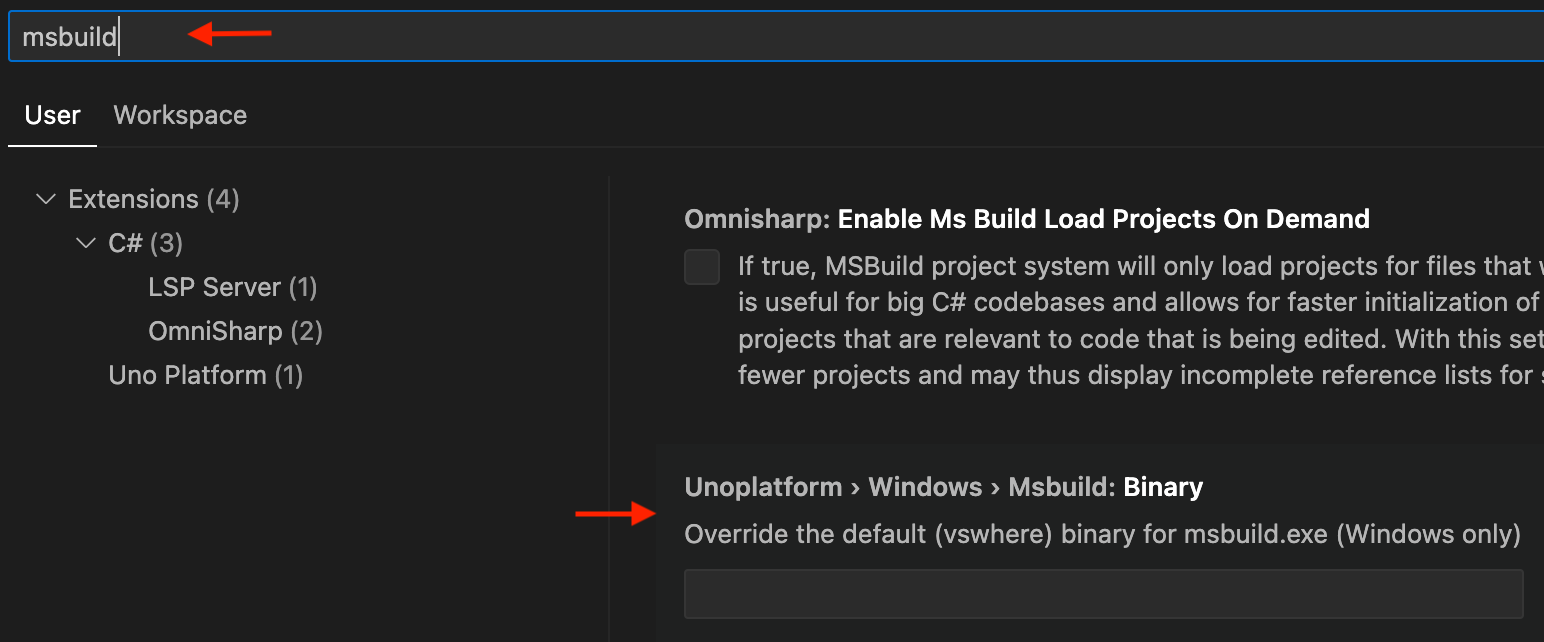
With version 0.14 (and later) you can override the location of msbuild.exe by:
- Opening the Settings using
Ctrl+, - Searching for
msbuild - Setting the location where your
msbuild.exeis located
Hot Reload Errors
UNOHR0001
The compiler could not produce a Hot Reload update for a change: the C# compiler failed with an exception while emitting the update, instead of reporting the change as unsupported. The DevServer reports it as a rude edit, and the exception is in the DevServer log.
The change was not applied, and the running app is unaffected. Hot Reload stays on the last version it applied, so to keep going:
- Undo the change and save. Hot Reload reports no changes, and the following edits apply as usual.
- Or restart the app to pick up the change.
A known cause is dotnet/roslyn#86045: adding or changing an async lambda that awaits a dynamic value. Uno.Extensions MVUX generated such code for commands before unoplatform/uno.extensions#3227, so changing a command's parameters could trigger it.
UNOHR0002
Hot Reload was blocked by compilation errors, or by a XAML generator error, in a project whose target framework defaults to a newer C# version than the compiler Hot Reload uses. Your build uses the .NET SDK's compiler, but Hot Reload compiles your changes with the compiler embedded in the Uno DevServer. When that compiler is older, syntax from the newer C# version builds fine but fails in Hot Reload, and every change to that project is blocked, XAML-only changes included. A XAML error can come from the same cause, for example an x:Bind to a member declared after that syntax. The message names the project, its default C# version and the newest version Hot Reload supports.
To fix it, either:
- Update Uno.Sdk to a version whose DevServer supports that C# version.
- Or set
<LangVersion>in the project to the version the message names, for example<LangVersion>14.0</LangVersion>, and avoid newer syntax.
For example, net11.0 projects default to C# 15, so a labeled continue outer; blocks Hot Reload until the DevServer embeds a C# 15 compiler.